Choosing an office chair is not simply about finding a soft cushion or selecting the model with the most features. A chair that works well for a remote worker spending eight hours at a desk may not be the same chair that suits someone who uses a workstation occasionally.
For people who spend significant time working at a desk, an office chair should support natural movement, fit individual body dimensions, and work together with the rest of the workstation. Dynamic posture support is not about holding the body in one “perfect” position. Instead, it allows users to shift positions, lean forward, recline, and make small adjustments while maintaining stability.
The best chair choice depends on factors such as daily sitting duration, body measurements, work habits, desk setup, and adjustment range. More adjustment options do not always mean a better chair. The important factor is whether those adjustments allow the chair to match the user’s body size, working position, and daily routine.
Office seating was once often associated with maintaining a rigid upright posture. Modern ergonomic guidance places more emphasis on supporting neutral positions while allowing people to change positions naturally throughout the day.
The Occupational Safety and Health Administration (OSHA) recommends that computer workstations support neutral body positioning and allow workers to adjust equipment to reduce awkward postures. OSHA’s workstation guidance also emphasizes that seating is only one part of an ergonomic setup, alongside factors such as monitor placement, keyboard position, and desk height.
Ergonomic guidance from organizations such as OSHA and Cornell University’s Ergonomics program focuses on adapting the workstation to the individual user rather than expecting everyone to sit in exactly the same way.
Dynamic posture support means the chair can respond as the user moves between different activities. Someone may lean slightly forward while writing, sit more upright during focused computer work, or recline during a phone call or meeting. A chair that accommodates these changes can be more practical than one designed around a single fixed sitting position.
The goal is not to eliminate movement. Remaining in one position for too long may contribute to discomfort for some users, while a chair that allows controlled movement makes it easier to adjust throughout a long workday.
The amount of time spent sitting should influence which features deserve the most attention.
For occasional desk use, a simple chair with reliable height adjustment, comfortable cushioning, and basic back support may be enough. Someone who uses a desk only a few hours per week may not benefit significantly from advanced adjustment systems that add cost and complexity.
For people who work at a computer most of the day, adjustment range becomes much more important. Features such as adjustable lumbar support, seat depth adjustment, movable armrests, and a responsive recline mechanism can help the chair better match the user’s body and working style.
A chair designed for long sessions should not only feel comfortable during a short showroom test. It should continue providing support after several hours of regular use.
The most suitable office chair depends partly on the activities performed during the day.
Remote workers often spend more time in their chair because the home office may serve as their primary workspace. In this situation, long-term comfort, breathable materials, and flexible adjustment options may matter more than appearance.
People who spend many hours programming, analyzing data, or completing detailed computer tasks may place greater importance on stable back support, comfortable arm positioning, and proper seat depth. Small fit problems that seem minor at first can become distracting during long periods of concentration.
Creative professionals often move between different activities, such as computer work, reviewing materials, and discussing ideas. A chair that allows easier movement and position changes may be more useful than one designed only for upright typing.
For people who spend much of the day in meetings or calls, a comfortable recline function and supportive backrest may become more valuable because the chair is used in a wider range of positions.
The most useful question is not which chair has the longest list of features. It is whether the chair’s adjustments support the way the user actually works.
Office chairs are often grouped into categories such as ergonomic chairs, executive chairs, and gaming chairs. These labels can be useful for describing design styles, but they do not guarantee a specific level of comfort or support.
An executive chair may have a larger appearance and thicker padding, but that does not necessarily mean it will fit every user. A gaming chair may provide a distinctive design and reclining features, but the shape may not suit everyone’s body dimensions or daily work needs.
An ergonomic chair is not defined only by the label. The more important factors are whether the seat height, seat depth, lumbar support, armrests, and movement controls can be adjusted properly for the individual user.
When comparing chairs, measurements and adjustment range are usually more useful than category names.
Chair specifications are easier to evaluate when compared with personal measurements. Many people choose chairs based only on appearance or general size labels such as “large” or “executive,” but these descriptions do not always reflect how well a chair will fit.
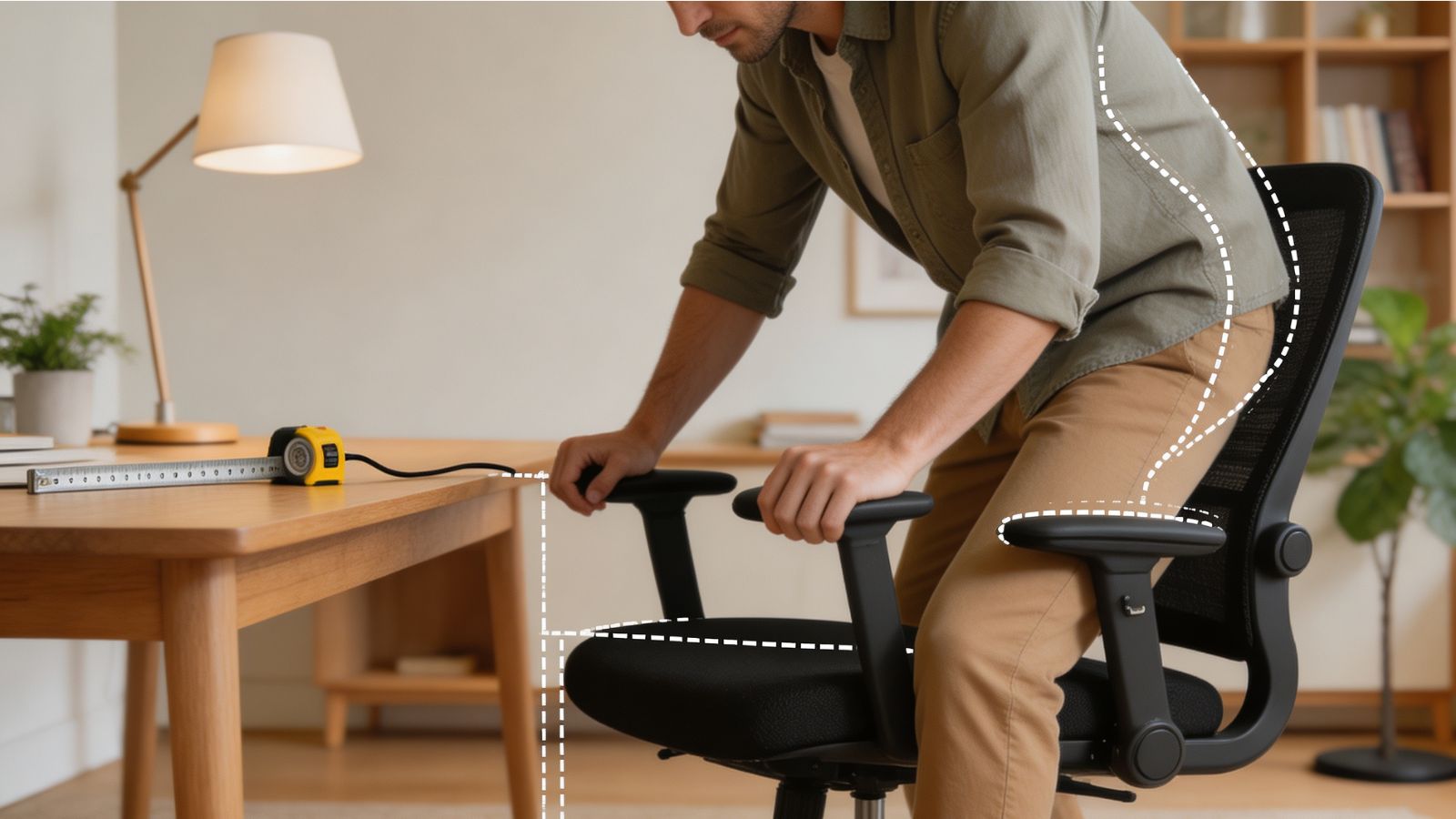
Seat height should allow the feet to rest comfortably on the floor while keeping the body relaxed. For many users, the knees should remain around hip level or slightly lower.
A chair that is too high may leave the feet unsupported and increase pressure under the thighs. A chair that is too low may encourage awkward sitting positions. The correct height allows the user to sit comfortably without needing to compensate through posture changes.
Seat depth affects how well the chair supports the legs. A properly sized seat allows the user to sit back against the backrest while leaving enough space between the front edge of the seat and the back of the knees.
If the seat is too deep, it may press against the legs or make it harder to use the backrest properly. If it is too shallow, the thighs may receive insufficient support. Adjustable seat depth is especially useful because people vary significantly in leg length.
Armrests should support relaxed arm positioning rather than forcing the shoulders upward or downward.
When properly adjusted, the shoulders should remain relaxed and the elbows should stay close to the body. Armrests that are too high may create shoulder tension, while armrests that are too low may encourage leaning or reaching.
OSHA’s workstation guidance also highlights the importance of properly positioned chairs and arm supports as part of maintaining comfortable working positions.
Lumbar support is designed to support the natural curve of the lower back. Adjustable lumbar systems can be useful because people have different body shapes and sitting preferences.
However, more support does not always mean better support. The chair should provide comfortable contact without pushing aggressively against the lower back or forcing the body into an unnatural position.
A reclining backrest allows the chair to support different activities throughout the day. A more upright position may be preferred during focused keyboard work, while a slight recline may feel more comfortable during reading, conversations, or breaks.
Tilt tension adjustment is another useful feature because it allows the chair to respond more naturally to the user’s body weight. A chair that moves too easily may feel unstable, while one that resists movement may discourage natural position changes.
Materials influence comfort, durability, and maintenance. Mesh backrests are popular because they allow airflow and can provide flexible support. Upholstered chairs may offer a softer feel but can vary widely depending on the quality of the padding and fabric.
The ideal seat cushion balances firmness and pressure distribution. A very soft cushion may feel comfortable initially but may provide less consistent support during long sessions. A very firm cushion may create pressure points for some users.
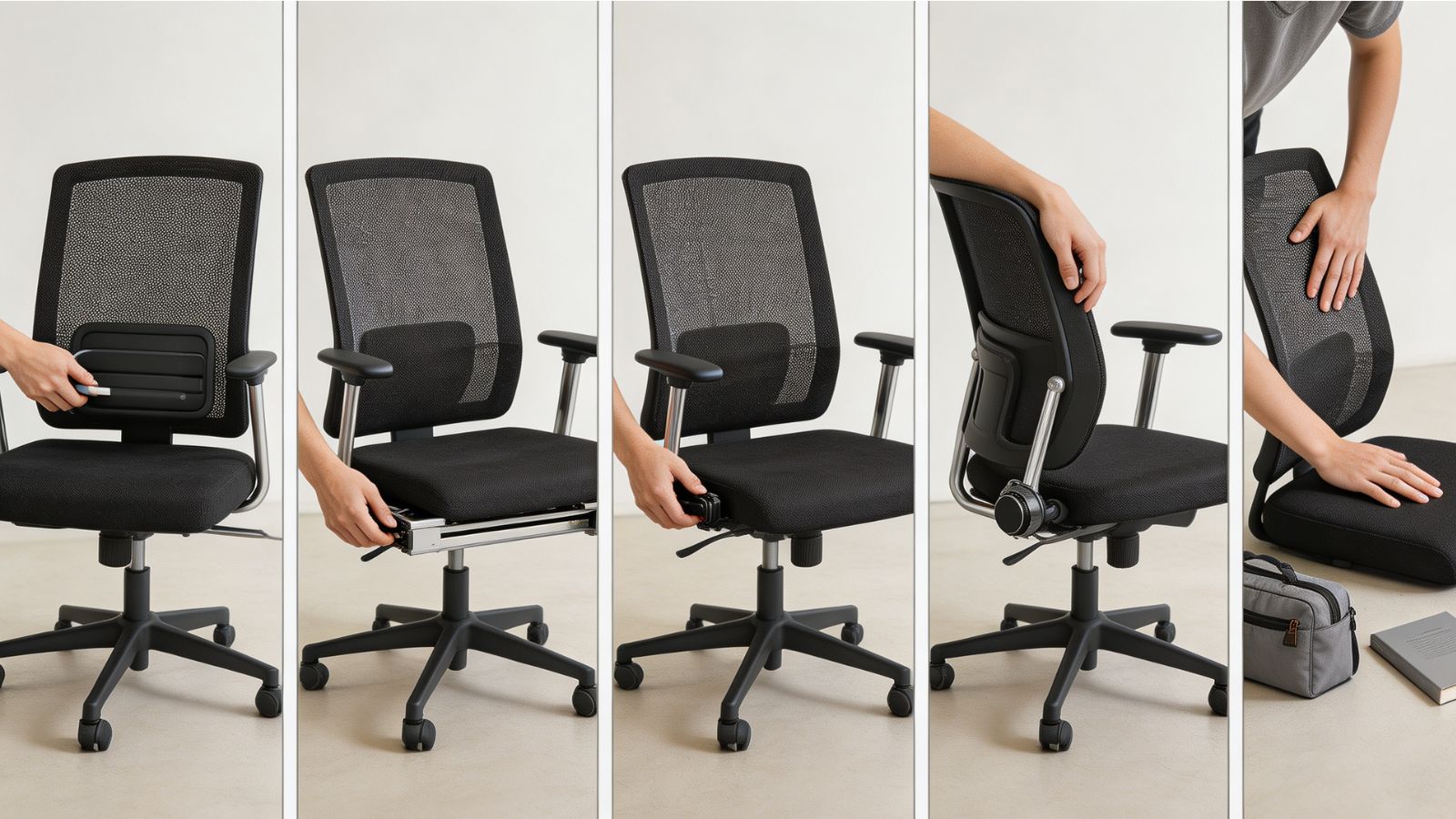
A common mistake is choosing a chair by counting features rather than evaluating whether those features are useful. A chair with fewer but better-fitting adjustments may provide more value than a chair with many settings that do not match the user’s needs.
Before buying, consider the adjustment range rather than simply checking whether a feature exists. A chair may include lumbar support, armrests, and tilt controls, but those features only help if they can be positioned correctly.
Durability also matters for anyone using a chair daily. Look at the quality of adjustment mechanisms, warranty information, and whether replacement parts or maintenance support are available. A chair used eight hours a day experiences much more wear than one used occasionally.
When buying online, a reasonable return policy can also be valuable. Comfort depends heavily on individual body proportions and workstation arrangements, which can be difficult to judge from product photos alone.
One frequent mistake is choosing a chair based only on appearance. A stylish design does not necessarily provide the adjustment range needed for long computer work.
Another mistake is assuming a higher price automatically means better ergonomics. More expensive chairs may include advanced features, but those features only provide value when they fit the user’s body and working habits.
It is also easy to overlook the rest of the workstation. Even a well-designed chair cannot fully compensate for a monitor that is too low, an incorrectly positioned keyboard, or a desk that does not match the user’s sitting height.
Ergonomic seating works best as part of a complete workspace setup rather than as a standalone solution.
A good office chair can improve comfort, but it should support better work habits rather than replace them.
Changing positions during the day, standing periodically, and adjusting the chair when switching tasks can all contribute to a more flexible workstation. The most effective setup allows movement while providing enough support for focused work.
Selecting an office chair for long work hours requires more than comparing prices or choosing the model with the most features. A suitable chair combines dynamic posture support, useful adjustments, proper sizing, and compatibility with the user’s daily activities.
The best office chair is one that fits the person using it. By considering work habits, measuring body dimensions, and evaluating adjustment quality, buyers can make a more informed choice and create a workstation that remains comfortable over time.
